Business workflow improvement for growing businesses

Save Working Hours. Reduce Waste. Increase Profit.

We identify where your business is losing time, money, and sales opportunities — then improve the workflow and measure the impact.

No unnecessary software. No one-size-fits-all solution.

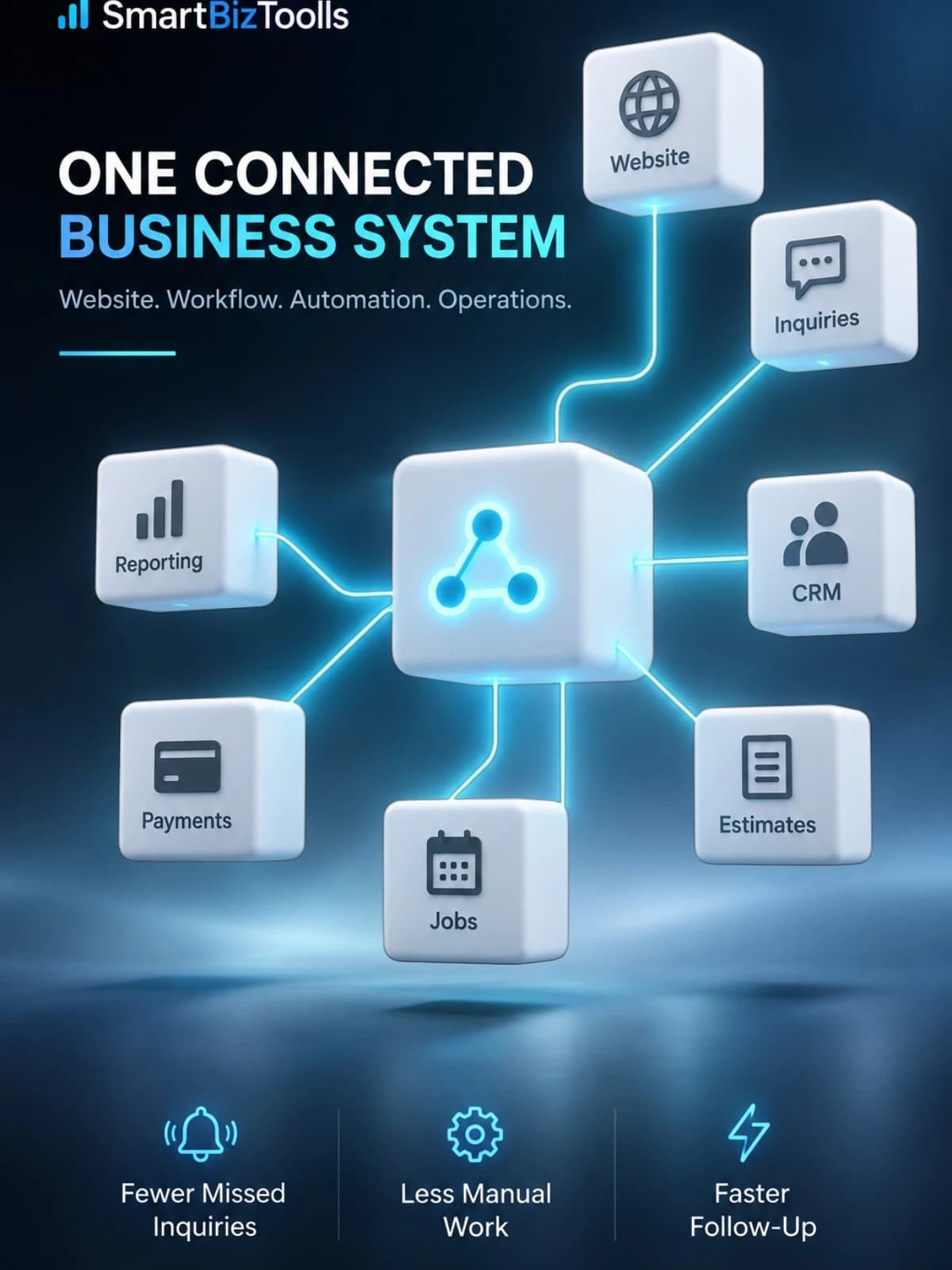
SmartBizToolls connected business system linking website, inquiries, CRM, estimates, jobs, payments, and reporting.

OUTCOME-FOCUSED PROCESS

Measure → Improve → Automate → Measure Again

Workflow first. Software second.

  1. Measure

    Understand the current workflow

  2. Identify

    Find lost time, money, and opportunities

  3. Improve & automate

    Fix the process before adding tools

  4. Measure again

    Compare the business impact
SmartBizToolls business outcomes

  • Save time

    Reduce avoidable working hours

  • Reduce waste

    Remove duplicate and manual work

  • Improve processes

    Make everyday work clearer and faster

  • Increase profit potential

    Recover time and sales opportunities

The everyday problem

Your Business Shouldn't Run Through Scattered Tools

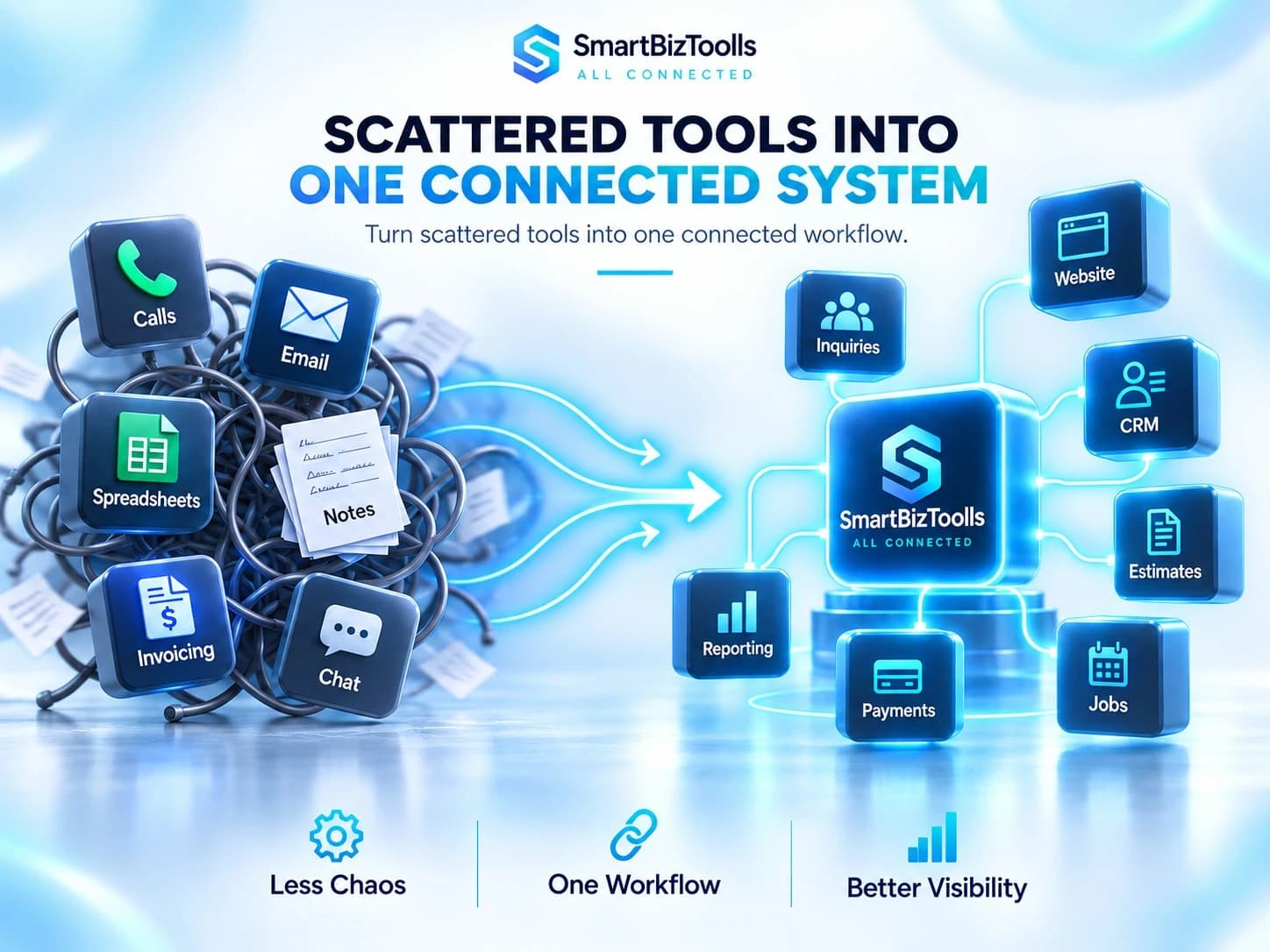
Customer information gets lost when the day depends on disconnected inboxes, notes, and software. We map the gaps before recommending a fix.

Scattered business tools flowing into one connected SmartBizToolls workflow

Connected business system

One Website. One Workflow. One Business System.

Your website can become the front door to a connected operating workflow—not another isolated tool.

YOUR WEBSITE

The connected starting point

  1. 01

    Customer Workflow

    Capture every inquiry and make the next step clear.

  2. 02

    Automation

    Move information and trigger follow-up without duplicate work.

  3. 03

    Business Operations

    Connect estimates, jobs, invoices, and payments.

  4. 04

    Management & Insights

    See status, bottlenecks, and performance in one place.

  5. 05

    Managed Infrastructure

    Keep the supporting systems maintained and reliable.

A connected customer journey

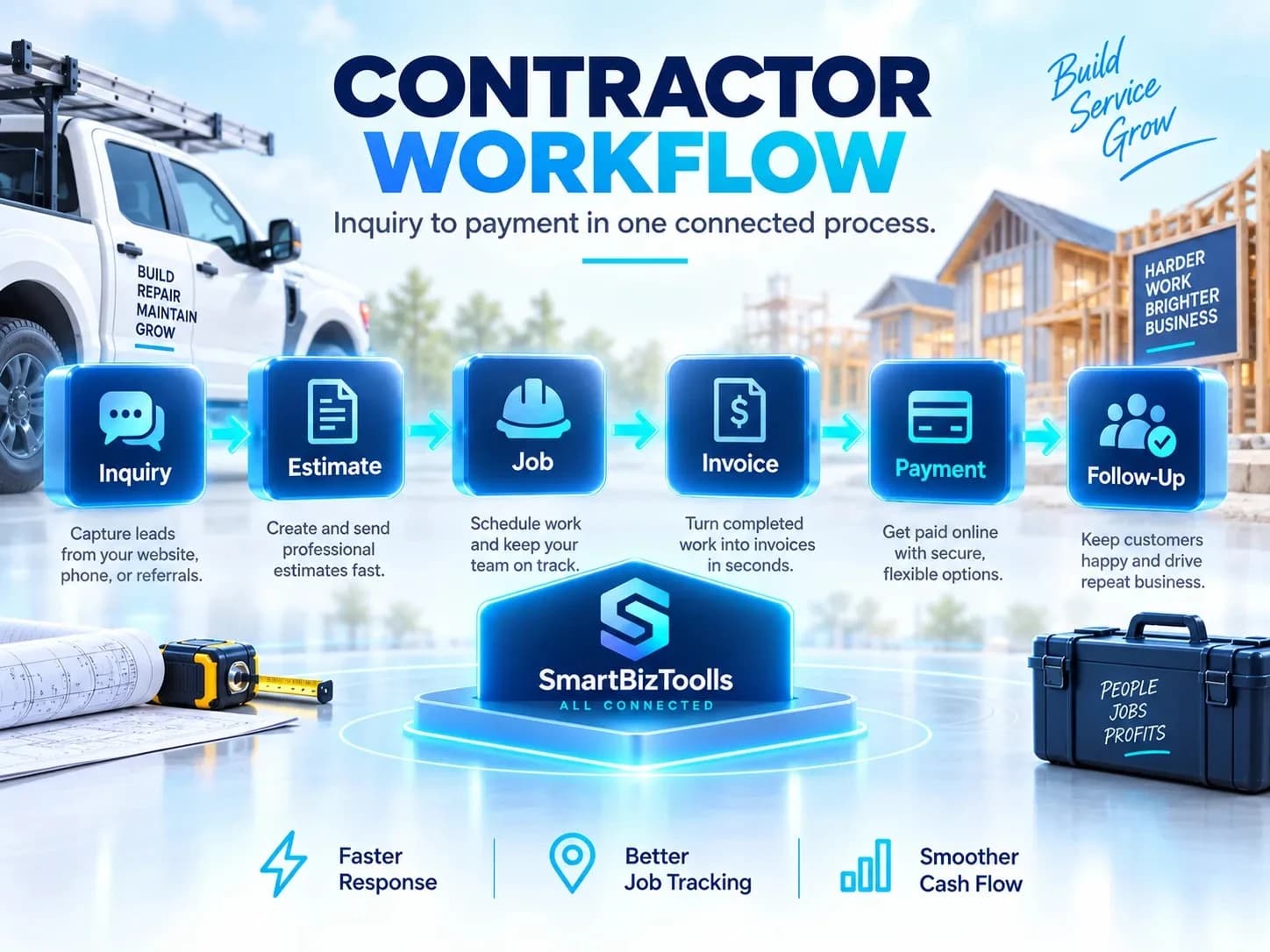
From Website Inquiry to Paid Job

For contractors and service businesses, the workflow continues long after a customer submits a form. Each step should create a clear next action.

Contractor workflow from inquiry to payment using SmartBizToolls

How it works

Measure. Identify. Improve. Automate. Measure Again.

A practical improvement cycle keeps technology tied to a real business outcome.

  1. STEP 01

    Measure

    Understand the current process, workload, and response times.

  2. STEP 02

    Identify

    Find wasted hours, missed opportunities, and disconnected steps.

  3. STEP 03

    Improve

    Simplify the workflow before choosing or changing software.

  4. STEP 04

    Automate

    Automate the useful, repeatable steps that support the team.

  5. STEP 05

    Measure Again

    Compare the improved process and identify the next opportunity.

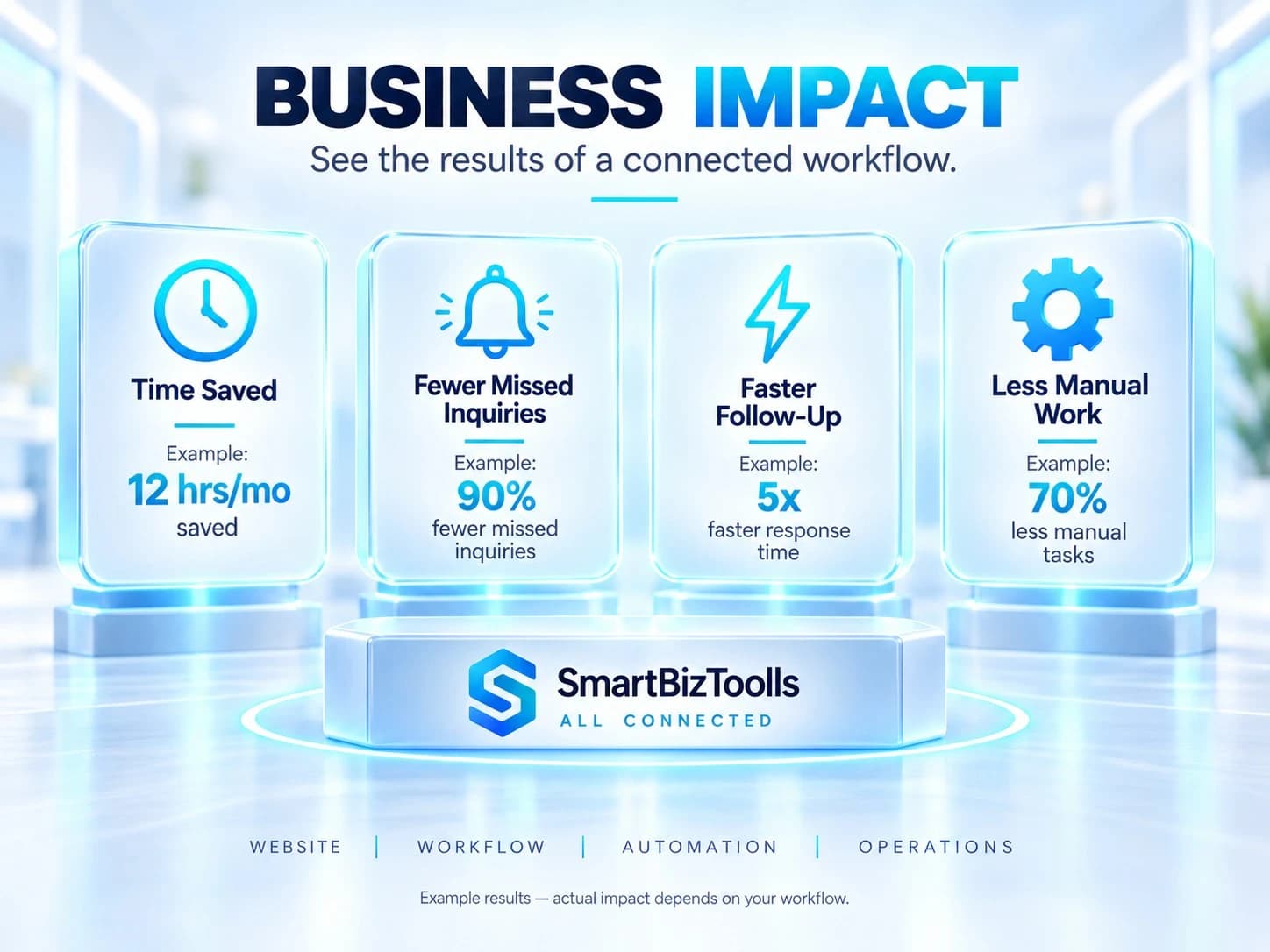
Business impact

Measure What Changes After the Workflow Improves

The goal is a visible operational improvement—not simply another software installation.

Business impact examples showing time saved and faster follow-up

These are example improvement areas, not guaranteed outcomes. Actual results depend on the starting workflow, project scope, implementation, and consistent use.

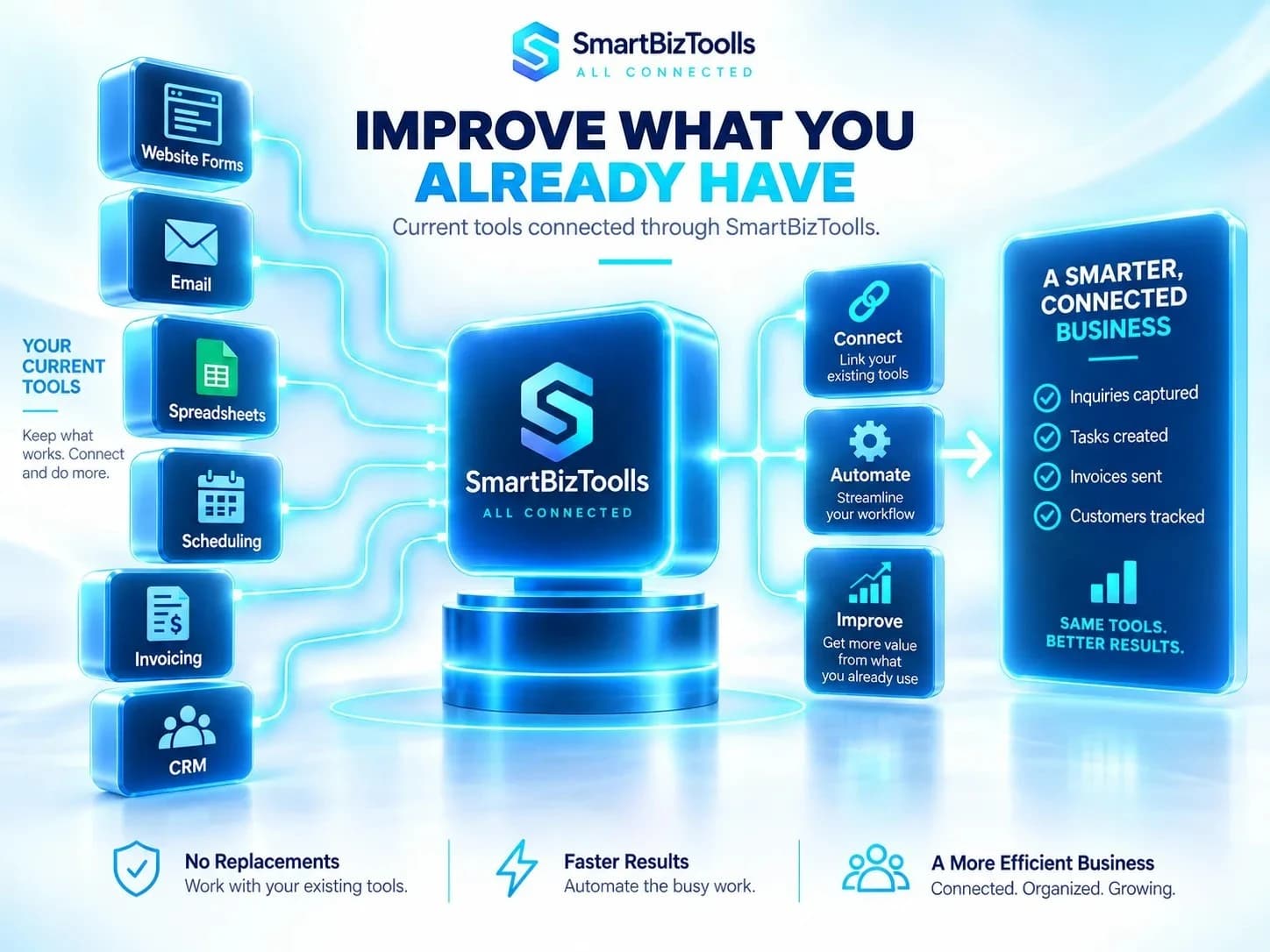
Improve before replacing

You May Not Need New Software

We first look at how to improve what you already have.

Improve first. Replace only when there is a clear business reason.

We review how the current setup is used, where work still becomes manual or unreliable, and which practical changes could improve the result.

Existing tools connected through SmartBizToolls instead of being replaced

Built around the business

Your Business. Your Workflow. Your Solution.

Your business should not have to change just to fit a software package. We understand the process first, then choose the simplest suitable solution.

Software comes second. Your workflow comes first.

Improve an existing system

Connect existing tools

Add useful automation

Set up or improve CRM

Build a simple custom workflow

Use CRM Gem or another suitable platform

Services built around outcomes

Improve the work before choosing the software.

The service starts with the business outcome—not a preferred platform or a list of technical features.

Implementation is tailored to the business problem and existing workflow.

The Business Workflow Review comes first. We then recommend the appropriate improvements and provide a fixed estimate based on the agreed scope, existing systems, and required implementation.

Customer Workflow Improvement

Create a clearer path from inquiry to follow-up, estimate, invoice, and payment.

Business Process Automation

Reduce repetitive manual work, avoidable admin, and unnecessary data entry.

CRM Optimization

Improve the CRM you already use or set up a suitable one around the real workflow.

System Integration

Connect websites, CRM, spreadsheets, email, forms, and other useful business tools.

Workflow Troubleshooting

Fix broken automations, failed connections, incorrect syncing, and unreliable processes.

Business System Review

Measure where time, money, productivity, and sales opportunities are being lost.

CRM Gem logo

CRM Gem

Connected business workspace

Live product

CUSTOMER WORK MODULES

Organized workflow
  • Estimates
  • Proposals
  • Invoices
  • Payments
  • Follow-ups
  • Recurring billing
Client, project, document, and follow-up workflowsCRM GEM

CRM Gem Integration

Keep customer work organized in one connected workspace.

CRM Gem is one of the tools SmartBizToolls can use when a business needs customer, project, estimate, invoice, payment, or follow-up organization.

We recommend it when it fits the workflow; other businesses may be better served by an integration, another platform, or a custom solution.

  • Clients
  • Projects
  • Estimates
  • Proposals
  • Invoices
  • Payments
  • Follow-ups
  • Recurring billing
Explore CRM Gem (opens in a new tab)

Optional ongoing support

SmartBizToolls System Care

Ongoing practical support for systems that need regular attention after handoff.

Care plans are tailored to the systems, monitoring needs, and level of ongoing support required. Larger changes and new integrations are estimated separately.

Discuss System Care
  • Automation monitoring
  • Small workflow changes
  • CRM adjustments
  • Message and form updates
  • Troubleshooting
  • Minor improvements
  • Monthly system review

FAQ

Questions before starting a project.

Clear answers about scope, pricing, setup, support, and how SmartBizToolls works.

What happens during a Business Workflow Review?

We examine how work happens today, where staff time is being wasted, where customer opportunities may be missed, and which improvement should be addressed first. You do not need to prepare a technical specification.

Do I need to replace my current software?

Not necessarily. SmartBizToolls first reviews whether your existing CRM, spreadsheets, forms, accounting system, or automations can be improved before recommending something new.

How are workflow improvements measured?

Depending on the project, we can compare working hours, manual steps, response times, missed follow-ups, visibility, or estimated operational savings before and after implementation. Results depend on each business and are not guaranteed.

How do I get a fixed estimate?

After the workflow review, we recommend a practical approach and provide a fixed estimate based on the agreed problem, deliverables, and required scope.

How is implementation pricing decided?

Pricing depends on the business problem, existing systems, required workflow improvements, integrations, implementation scope, and handoff needs. After the Business Workflow Review, your fixed estimate will state the exact work included.

Do I have to use CRM Gem?

No. CRM Gem is one tool SmartBizToolls can use when it fits the customer, project, estimate, invoice, or follow-up workflow. We may recommend another platform, an integration, or a simpler solution instead.

Explore CRM Gem (opens in a new tab)

Can you help with email and WhatsApp workflows?

Yes. Depending on scope, this can include follow-up emails, confirmations, reminders, customer messages, notifications, and internal alerts. More complex marketing automation is scoped separately.

Do I need a full ERP for inventory or operations?

Not always. We first review how stock, purchases, suppliers, sales, and other operations are tracked, then recommend a simple workflow, integration, ERP setup, or custom connection where appropriate.

What does SmartBizToolls System Care cover?

Depending on the agreed care plan, support may cover automation monitoring, small workflow changes, CRM adjustments, message or form updates, troubleshooting, minor improvements, and periodic system reviews. Larger changes and new integrations are quoted separately.

How long does a project take?

Timing depends on the approved scope, access to existing systems, content or data readiness, integrations, testing, and feedback. The expected schedule is confirmed before implementation.

Straightforward project guidance

Simple, Transparent Pricing

Workflow projects start at $399. We first review your current process, existing software, and automation needs. Then we provide a fixed quote based on the actual work required.

No unnecessary software. No surprise fees.

  1. Business Workflow Review

    Free

    • Review current workflow
    • Identify wasted time and manual work
    • Review existing software and automation
    • Identify improvement opportunities
    • Recommend the next practical step
    Book a Free Workflow Review
  2. Workflow Setup

    Starting at $399

    • Simple workflow improvements
    • Lead capture setup
    • Follow-up automation
    • Basic system connections
    • Simple CRM/workflow configuration
    • Testing and handoff

    Final pricing depends on your existing tools, workflow complexity, and required integrations.

  3. Ongoing System Care

    Starting at $89/month

    • Automation monitoring
    • Workflow adjustments
    • Troubleshooting
    • Minor improvements
    • System maintenance
    • Ongoing support

    More advanced support or custom work may be quoted separately.

We review first, then quote the work that actually makes sense.

Workflow Review → Recommendation → Fixed Quote → Implementation → Optional Ongoing System Care

CONNECT THE WORK

Turn Your Website Into a Working Business System

Connect customer inquiries, follow-up, estimates, jobs, invoices, payments, and reporting into one workflow.

Practical improvements. Measurable outcomes.

Book a Business Workflow Review

SUPPORT EMAIL

support@smartbiztoolls.com

Business Workflow Review

Find Out Where Your Business Is Losing Time and Money

We review your current workflow and identify practical opportunities to save working hours, reduce manual work, improve customer follow-up, and get more value from existing systems.

WHAT YOU GET FROM THE REVIEW

  • Workflow assessment
  • Wasted working hours & manual processes
  • Missed inquiries & follow-ups
  • Existing software & automation review
  • Estimated potential time savings
  • Recommended practical improvements

Required fields are marked below. We use these details only to review and respond to your inquiry.

1. Contact Details
2. Business Details

Type to search or select a country.

3. Workflow Details

Focus on the business process and desired outcome; technical details are optional.

4. Supporting File

PNG, JPG, WebP, or PDF. Maximum 4 MB.

We will review the workflow first. If there is a suitable next step, we will recommend an approach and provide a fixed estimate for the agreed scope.

By submitting, you acknowledge our Privacy Policy and Terms of Service.